
Editor’s note: This is the first part of a two-part series on choosing the most appropriate AI tool for finance and accounting use. It provides a simple tour of the major AI tools. Part 2 will look at considerations for the enterprise-wide choice, e.g., where AI should sit, what it should be allowed to access, and how far it should be trusted to act before a human steps in.
Everyone wants to know which artificial intelligence (AI) tool is “best”. That is the wrong question, but a very useful starting point. In this article on AI tools for finance professionals, we cut through the noise and look at what OpenAI’s ChatGPT, Anthropic’s Claude, Google Gemini, Microsoft Copilot, and specialist research tools actually do well, where they fall over, and how finance professionals should decide which one belongs in the job, not merely in the hype cycle.
At almost every AI session I run, someone asks the same deceptively simple question: “Which AI tool should I use?”
It is usually asked with the hopeful expression of someone who wants one name, one subscription, and one less thing to think about. Sadly, that’s not how it works. If only it were that simple.
For accountants and finance professionals, the question is not academic. These tools are already being used to turn month-end variance notes into draft commentaries, summarise Teams meetings before the action list is forgotten, review lease clauses for a first pass at accounting treatment, explain why a forecast has gone sideways, and prepare the first draft of a board pack. AI can improve efficiency and insight, but it does not replace professional judgement, verification, or confidentiality obligations. In other words, the machine may help you write the memo, but it will not stand beside you when the regulator asks awkward questions.
At present, the main contenders for professional work are ChatGPT, Claude, Gemini, and Copilot. Perplexity and other specialist tools also have a role, particularly for research, but this article focuses on the names most likely to appear in your inbox, information technology (IT) road map, or a colleague’s enthusiastic lunchtime demonstration.
To be clear, there is no universal “best” tool. There is only the right tool for the job, the data, the system, and the risk. That distinction matters. Asking which AI is best is rather like asking which Excel function is best. SUM is brilliant until you need XLOOKUP, and XLOOKUP is brilliant until you realise the problem was bad data all along.
In this first of two articles, I will take a simple tour of the major tools: what they are good at, where they fall short, and how an accountant or finance team might sensibly choose between them. In Part 2, I will move beyond “which chatbot?” and look at the more important organisational question: how these tools would connect to your systems, your data, and your workflows.
Before we begin, one warning applies to every tool discussed here: They can all hallucinate. That is the polite AI term for “make things up with great confidence”. The output may look beautifully structured, cite impressive-looking sources, and still be wrong. Accountants should find this reassuringly familiar: Presentation is not evidence.
You should use AI as a capable assistant, not an unqualified reviewer. Check facts. Verify numbers. Read the sources. Professional scepticism is not optional just because the answer arrives quickly.
With that caveat firmly stapled to the front of the file, let’s look at the contenders.
AI platforms are changing quickly. This article reflects the position at the time of writing and should be treated as a practical guide only.
ChatGPT: The general-purpose workbench
ChatGPT is still the name many people use as shorthand for generative AI, much as “Excel” became shorthand for “spreadsheet” regardless of what your IT department installed. Its strength is breadth. It is the tool I would test when the job is messy rather than neatly labelled: “Draft the board commentary, explain the workbook logic, turn a technical accounting point into plain English, then produce the email that asks the business unit for the missing assumptions.” Ideas for its use include:
- Projects: If you want to keep everything for a client or engagement together, it gives you one workspace for files, instructions, and conversations.
- Custom GPTs (generative pre-trained transformers): Allows the creation of helpful IFRS Standards, US GAAP, tax, or policy agents that you can share across your team.
- Agent-style work features: In eligible subscription plans, give it a broader task, and let it work across connected applications rather than waiting for you to guide every step.
- Deep research: Where available, it searches multiple sources and produces a cited report that still needs professional review.
- Connectors and file creation: In supported plans and approved environments, it can pull information from connected tools and turn it into usable spreadsheets, presentations, and documents.
- Excel and PowerPoint add-ins: Where supported, add-ins let you use ChatGPT-style assistance inside files you already work in, reducing copying and reformatting.
- Graceful degradation: If you hit a model limit (e.g., number of prompts, context limits, restrictions due to subscription tier), the conversation continues on a smaller model, so work slows rather than stops.
A practical example: Give ChatGPT a draft profit and loss commentary, the list of material variances, and the tone you want for the finance director. It can produce a sensible first version of the commentary in minutes. You still need to check every number, every causal explanation, and every implied promise. “Sales were down because demand softened” sounds plausible; “sales were down because two large customers deferred orders and one distributor overstocked in June” is the sort of explanation a human still needs to verify.
Best for: General drafting, idea development, first-pass analysis, training examples, policy summaries, spreadsheet explanations, and “I need a starting point” tasks.
Watch out for: Plan limits, feature differences between free and paid tiers, and the temptation to accept a confident answer without checking the underlying facts. ChatGPT is versatile, but versatility is not the same as authority.
Claude: The writer and document organiser
Claude has a reputation for thoughtful writing and handling long documents well. It is often strong where accountants spend much of their lives: reading lengthy material, extracting the important bits, and producing a polished narrative. If you have ever had to turn a 60-page board pack into a two-page briefing note, you will understand why this matters. Assistance includes:
- Projects: Use for keeping the files, instructions, and conversations for each client or engagement together in one workspace.
- Artifacts: Create, view, and refine documents, diagrams, or other outputs beside your conversation.
- File creation: Ask for a spreadsheet, presentation, or document and receive a usable file rather than instructions for building it.
- Agent-style work features: In eligible plans, give it a broader goal and let it complete multistep work across approved files while you review the result.
- Research: Where available, it can investigate multiple sources and turn the findings into a report or other deliverable for review.
- Microsoft 365 integration: In supported environments, use Claude models for research and document or spreadsheet work within parts of the Microsoft ecosystem.
- Drafting quality: It can produce natural first drafts that usually need fewer revisions for commentary, reports, and board papers.
A practical example: Feed Claude the audit committee paper, the risk register, and the finance director’s notes from the last meeting, then ask for a two-page briefing with the three decisions required. Claude is often good at separating the signal of important information from the noise of the supporting documentation. It may also make the prose sound calmer and more coherent than the meeting that produced it, which is useful, if occasionally misleading.
Best for: Long-form analysis, report drafting, contract or policy review, board papers, technical summaries, and turning messy notes into something that sounds as if a human stayed awake while writing it.
Watch out for: Usage limits, paid-plan requirements, and the need to check source material carefully. Claude may write beautifully, but beauty is not a control procedure.
Google Gemini: The Google-native researcher
Gemini’s obvious advantage is its connection to Google’s ecosystem. If your organisation lives in Gmail, Google Docs, Google Sheets, and Google Drive, Gemini is not merely another chatbot — it is an assistant sitting in the same neighbourhood as your work. It is also useful when the answer depends on current web information, provided you still check what it finds. Its help includes:
- Workspace side panel: Use Gemini inside Gmail, and Google Docs, Sheets, Slides, and Drive without switching tabs or uploading files again.
- Gems: Create specialist assistants for recurring tasks and share them with colleagues across your organisation.
- Deep Research: Where enabled, it can research the web and selected Google Workspace content to produce a detailed report.
- NotebookLM: Upload company documents and ask questions grounded in those sources, which is useful for contracts, policies, and annual reports.
- Sheets and Slides integration: Analyse spreadsheets and create presentation content directly inside the Google Workspace tools you already use.
- Workflow automation features: In eligible Google Workspace environments, automate selected multistep tasks across supported connected applications, subject to administrator controls.
- Live web grounding: Where enabled, use current information from Google Search when the answer depends on what is happening now.
A practical example: A finance team working in Google Sheets could ask Gemini to explain movements in a rolling forecast, draft a note for the commercial team, and pull together supporting commentary from Google Drive. That can be powerful when the source files are tidy and permissions are sensible.
Best for: Google Workspace users, current web research, source-grounded document review through NotebookLM-style workflows, and teams that already collaborate in Google’s applications.
Watch out for: Differences between personal and business features, availability by country or plan, and whether the organisation’s data governance rules permit the intended use. The integration is powerful, but only if the governance is not an afterthought.
Microsoft Copilot: The Microsoft 365 insider
For many accountants, Copilot may be the most practical option simply because it is where the work already is: Word, Excel, PowerPoint, Outlook, Teams, SharePoint, and OneDrive. Copilot’s advantage is not that it is clever in isolation. It is context: It sits inside the documents, meetings, and messages where the work already happens. It can work with the files, meetings, and messages your organisation already manages, subject to existing permissions. Benefits include:
- Notebooks: It can keep files, chats, meeting notes, and links for a client or project together in one shareable workspace.
- Copilot in the apps: Draft, analyse, and summarise directly inside Word, Excel, PowerPoint, Outlook, and Teams.
- Researcher: In eligible Microsoft 365 Copilot environments, combine information from the web and permitted work files to produce a detailed and cited report.
- Analyst: In eligible environments, analyse uploaded data, identify patterns, and produce forecasts or visualisations, subject to review.
- Work IQ: Ground Copilot in the documents, emails, meetings, and organisational context you already have permission to access.
- Agents and Copilot Studio: Build simple agents for yourself or your team, then use Copilot Studio for advanced workflows and integrations.
- Enterprise data protection: In eligible Microsoft 365 business and enterprise experiences, this protects prompts and responses under Microsoft 365 controls and does not use them to train foundation models.
A practical example: In a Microsoft 365 finance environment, Copilot can help compare actuals to budget, highlight the biggest variances, draft a management commentary, and prepare a first-cut slide for the monthly pack. In Microsoft’s finance examples, Copilot is no longer just drafting text: It is being positioned around variance analysis, reconciliations, and enterprise resource planning-linked workflows that support real month-end processes. That does not remove the need to understand the data model, the chart of accounts, or why supposedly “one-off” costs keep appearing every month with suspicious regularity.
Best for: Microsoft 365 organisations, meeting summaries, email triage, document drafting, PowerPoint slide creation, Excel assistance, and work where permission-aware access to organisational content is essential.
Watch out for: Licensing. Copilot Chat is not the same as the full Microsoft 365 Copilot experience. Some features require additional licences, administrator configuration, or usage-based credits. If that sentence made you sigh, welcome to enterprise software.
Open-source and open-weight models: Control, at a price
Open-source and open-weight models are worth mentioning, even if they will not be the starting point for most finance teams. To be clear on definitions:
- Open-source: The model’s underlying code is made available for others to inspect, use, modify, and depending upon the licence, redistribute.
- Open-weight: The trained model parameters are available to download or run, but the full training code, data, and development process may remain closed.
These models can make sense where an organisation needs tighter control over data, hosting, model behaviour, or cost at scale (be careful you choose the right one). However, “free to download” does not mean “free to run”. Someone still has to manage infrastructure, security, monitoring, updates, licences, and the inevitable moment when the model does something deeply unhelpful at 4.55pm on a Friday. Considerations include:
- Data control: Keep sensitive information within your chosen infrastructure and support data-residency requirements.
- Customisation: Adapt a model for specific workflows, terminology, and internal processes.
- Provider independence: Reduce reliance on one vendor and retain more control over model changes.
- Cost at scale: Smaller models can lower costs when routine tasks justify the infrastructure investment.
- Operating responsibility: Your organisation must manage infrastructure, security, monitoring, updates, and specialist support.
- Licensing: Check commercial-use, modification, and redistribution rights before adopting any downloadable model.
Best for: Organisations with specialist AI, security or data teams, clear data residency requirements, repeatable internal workflows, and the budget to support the operating model properly.
Watch out for: Licensing, support, security, model updates, and false economy. If a managed platform costs more but your team can deploy it safely next week, that may be cheaper than building a science project no one wants to own.
Perplexity and the specialist research tools
Perplexity is not quite the same kind of tool. It is best thought of as a research layer: Ask a question, receive a concise answer, and inspect the visible sources. For accountants, that can be useful when you need a quick map of a topic before going to authoritative guidance. It should not replace the guidance itself, unless you enjoy explaining to clients that your technical position was based on “something the internet said”. Examples of specialist tools include:
- Perplexity: Research current topics and receive direct answers with visible sources that your team can verify.
- Manus: Delegate multistep work such as research, data collection, and file creation without guiding every stage.
- Genspark: Combine research, automation, and content creation in one workspace for reports, slides, sheets, and other outputs.
Best for: Current research, source discovery, and checking whether a topic has moved on since you last paid attention to it. Use it beside your main AI platform, not necessarily instead of it.
Watch out for: Source quality. A citation is not the same as a reliable citation. For accounting, tax, audit, and regulatory matters, always work back to primary or authoritative sources before relying on the conclusion.
So which one should you use?
If you are choosing for yourself, start with the work you actually do, not the leaderboard you saw on social media. If you draft a lot, try Claude and ChatGPT. If your organisation lives in Microsoft 365, start with Copilot. If your work lives in Google Workspace or depends heavily upon live web context, Gemini deserves serious consideration. If you need traceable research, add Perplexity as a specialist tool.
The following summary table can help with decision-making.
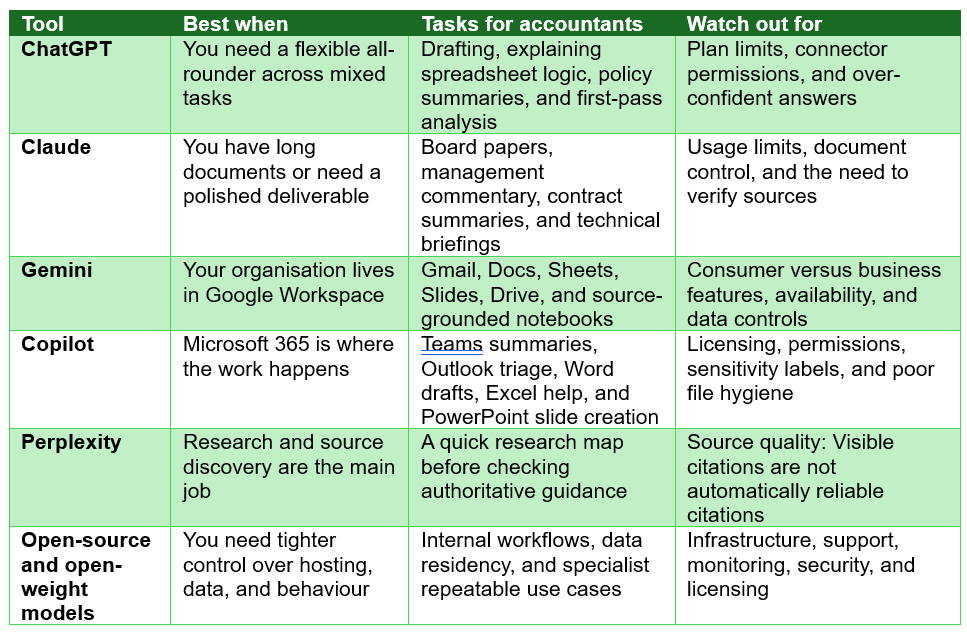
The table above is a starting point, not a rulebook. The best test is still a real task from your desk: Take a board paper, a month-end pack, a client email, a policy note, a cash flow forecast, a reconciliation exception list, or a spreadsheet explanation and run it through the tool. Then ask three questions:
- Did it save time?
- Was the output usable?
- Could I rely on it after review?
If the answer to any of these is no, the tool may still be interesting, but it is not yet useful.
Next time, in Part 2, we will move from the individual question to the organisational one: Once AI is connected to your files, meetings, emails, and workflows, how should you decide where it sits, what it can access, and how far might it run?
Liam Bastick, FCMA, CGMA, FCA, is director of SumProduct, a global consultancy specialising in Excel training. He is also an Excel MVP (as appointed by Microsoft) and coauthor of Python in Excel: Unlocking Powerful Data Analysis and Automation Solutions. To comment on this article or to suggest an idea for another article, contact Oliver Rowe at Oliver.Rowe@aicpa-cima.com.
LEARNING RESOURCES
Building a Roadmap to Your AI-Enabled Finance Function
In this course, you’ll define a clear vision for your finance function, assess current capabilities, uncover key transformation opportunities, and build a tailored, actionable roadmap to drive meaningful progress within your organisation.
COURSE
AI Accelerator Program — Transitional Tier
The Transitional AI tier is designed for accounting and finance professionals who are moving from foundational AI awareness to practical workplace application.
COURSE