From the first draft to the final presentation, finance professionals are using new artificial intelligence (AI) presentation tools to change how they tell a business’s story.
A generation of new software, much of it using generative AI, offers new ways to visualise data, hone messages, design slides, and even practise speaking skills.
“Nobody loves making slides. Let’s just say it. But if you work in finance, you’re going to present data,” said Muhammad Yaseen, FCMA, CGMA, senior manager-Finance Compliance at Sana Safinaz in Pakistan. Yaseen partners with executives on growth strategies and long-term financial planning.
“The question,” he said, “is whether you’ll spend three days on a deck, or 30 minutes and actually sleep before the meeting.”
Yaseen and others say new AI tools are making it easier to craft more powerful business presentations. Here’s how (see also the sidebar, “The AI Presentation Checklist”).
AI-powered slide creation
New tools — including from startups and within the Microsoft Office suite — offer ways to more quickly craft business presentations and data visualisations.
Startups and more mature companies offering their own AI-powered tools include Gamma, Presenti, Canva, Tome, PlusAI, and Beautiful.ai.
While the features of each option differ, they follow the same general process:
- For the basis of the presentation, the user inputs a prompt (eg, “Create a B2B sales deck”) or provides a file such as a Word document that may include YouTube URLs for embedding videos within slides. For prompting tips, see the FM article “5 Elements of an Effective AI Prompt”.
- The software automatically generates a slide deck based on the content of the prompt or document — or both.
- The user edits the presentation by editing text and changing the layout and presentation options.
Experimenting with one service, Gamma, showed both potential and frustration. It easily ingested an already published FM article, “How Accountants Can Combat the Rising Threat of Deepfake Fraud”, and generated a deck, with each slide focusing on a different area as shown in the images “Gamma-Created Example Slides”.
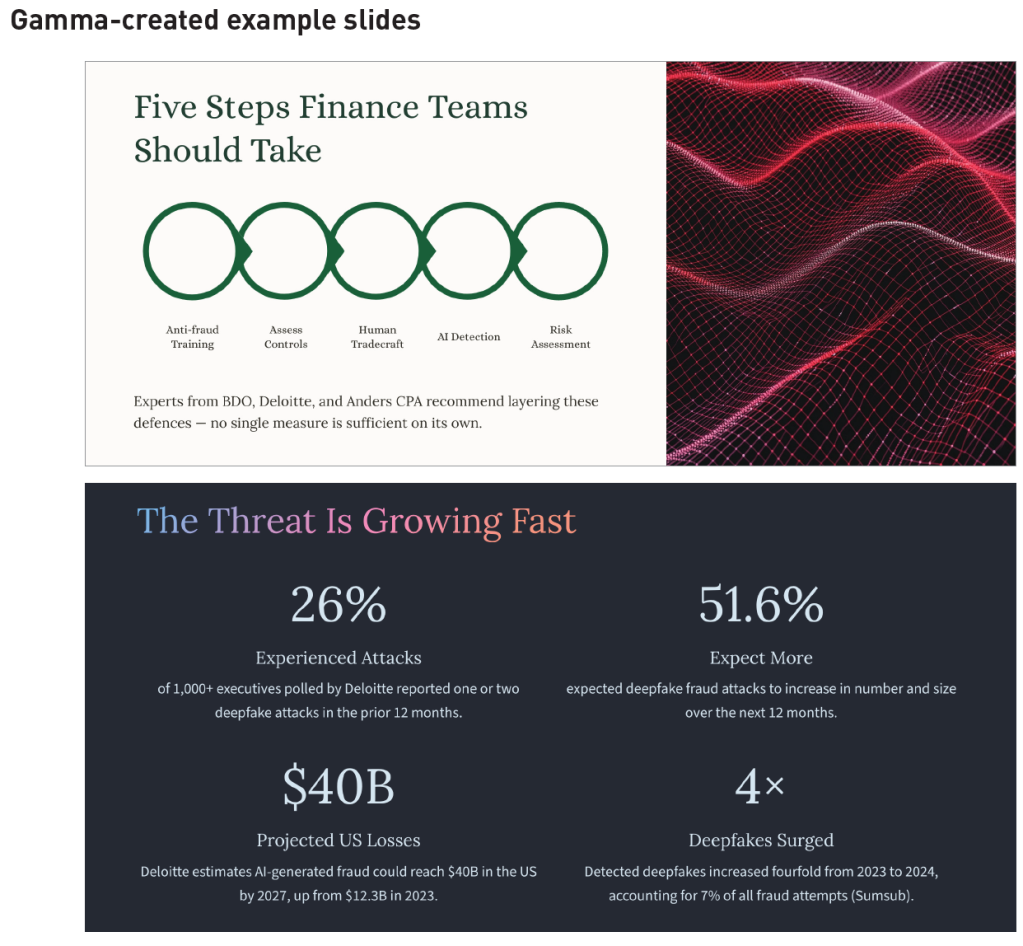
The software identified interesting numbers and points within the text, then transformed them into text boxes, charts, and AI-generated illustrations. The result was a slick presentation that would have taken hours to compile with older software, although it came with some compatibility issues, too.
“I upload the numbers, pick what story I’m telling, and it shows me different ways to display them. Sometimes I find patterns I hadn’t noticed before,” Yaseen said of Gamma.
Once Gamma’s draft was completed, each element could be easily transformed (eg, from a bulleted list to a timeline graphic). The AI-generated illustrations could be redrawn with a text prompt. And the software could even be asked to reconfigure entire slides — helpful when a layout was “too wordy”, for example. The AI interface also answers questions about how to use the software.
“It can make some really powerful slides. You can come up with graphics that would take you weeks and weeks to get right,” said Gavin Simpson, ACMA, CGMA, a fractional finance director.
But the platform has its quirks, too. Like other LLM-based software, it doesn’t always follow instructions. For example, Gamma struggled to fulfil a request to resize a slide into a 16-by-9 format, the standard for PowerPoint. It claimed to have done so, but it actually made no changes or repeatedly edited the wrong slide, apologising several times before finally succeeding.
Yaseen also cautioned that AI-generated images can be a turnoff for some audiences, especially if they appear generic or include flaws like extra appendages, which are common mistakes for AI.
Additionally, while Gamma includes a chart editor to easily create data visualisations in the style of the deck, some users may prefer Excel. Exporting the presentation to PowerPoint also resulted in minor issues such as missing fonts and images.
The tech giants are also moving quickly; Microsoft and Google have integrated generative capabilities directly into their flagship office suites, allowing users to generate slides from simple text prompts and uploaded files.
AI also can be used for a slew of more specific tasks within the Microsoft Office suite.
For example, Copilot in Excel can be asked to analyse a table and generate a slide highlighting critical points, or it can help with more complex visualisation tasks, such as highlighting outliers or comparing a budget to actual data. PowerPoint’s AI interface can be prompted to do everything from refining colour schemes to updating slides from relevant data sources.
Denise W. Grove, CPA, CGMA, founder and CEO of CFO Support Inc. and Grove Solutions LLC, said she’s been exploring AI presentation tools with interest. She’s hopeful that their visual flair and ease of use will improve her presentations to owners of small and medium-size businesses.
“The whole purpose of presentations and board meetings is to connect the information between all the members in the room. A picture says so much,” she said.
Grove is already using a tool incorporating AI, Canva, to create graphics for her social media posts and presentations. Canva can also create slide decks, but it also is meant for video editing, graphic design, and a wide range of other uses.
“It gives a person without graphic design talent a really easy kind of cut-and-paste ability to create a really interesting social media look,” Grove said. “My friends that are professional designers, they can spot Canva-generated stuff when they see it. But my business owners are not professional designers — and so hopefully I’m just getting their eye.”
Ideation and messaging for finance presentations
If AI tools can create an entire slide deck from scratch, what’s left for humans to do?
Lots, as it turns out. Even if tools like Gamma and Beautiful.ai can speed up the creation of visuals, it’s ultimately the human’s job to determine what message will resonate and what the audience needs to know.
Yaseen said he learned that lesson in his first encounter with an AI-powered presentation tool, which produced a “polished” but directionless slide deck.
“The AI didn’t know which numbers mattered to my audience. It couldn’t tell the story behind the variance in Q3. It had no idea what decision we were trying to drive toward,” he said.
Yaseen suggested defining three key questions before asking AI to create presentation content:
- What do I want people to understand differently after this presentation?
- Why should they care?
- What do I want them to actually do?
Answering those questions is a distinctly human endeavour, but it also can be aided by AI. Ulrike Kerber is a designer and AI researcher in Berlin who helps businesses craft and target marketing messages.
“I use Gemini and ChatGPT for ideation and maybe to create a message,” Kerber said. “We can now use AI to come up with … ideas, hundreds of ideas.”
Used correctly, AI can also allow for that kind of ideation and exploration during presentations by allowing the presenter to query and manipulate data from data tools in real time. That could allow finance leaders to dig into deep questions on the spot.
“Being able to query stuff in real time is so important,” Simpson said. “That’s what AI can give us; you can do your scenario planning live.”
But he and others cautioned that finance leaders must truly know their data and the capabilities of each AI tool before attempting to do real-time analysis. Additionally, they must follow privacy and security protocols when using AI. While using web-based tools, finance professionals should be cautious when sharing confidential client data, ensuring that platforms have been vetted and approved for use as appropriate.
AI as an audience member
However, AI doesn’t just generate content. It can respond to it as well.
The experts interviewed for this article said that AI tools can serve as a test audience, or an editor, for presentations.
Kerber calls it her “blind spot” detector.
“That’s one of the biggest strengths,” she said. “We are sitting alone at our desk working on something, and we have a ton of blind spots. … What [would] the other people in the room [be] thinking right now, what’s in their head? What am I not seeing here, what should I address here?”
Kerber notes that these tools are particularly effective for “divergent” thinking. They can generate dozens of variations on how a client might define itself, she said, based on a prompt rich with data about the company’s goals.
For example, asking the AI to present the same data through different lenses — like risk management versus aggressive growth — could help CFOs settle on the right message and tone. The AI also could be asked to review and fine-tune content for different audiences or personas, such as board members, investors, or internal teams.
“A presentation that resonates with a finance team might fail to land with a commercial lead; AI helps us identify those cognitive gaps before we hit the boardroom,” Simpson said.
Similarly, Yaseen might paste his own text into the AI tool and ask, for example: “How would I say this to someone who doesn’t work in finance?”
AI is also opening new avenues for how presentations are delivered. Simpson gave the example of NotebookLM, a Google tool that can turn documents into podcast-style audio presentations. That might be the way to connect, he said, with an executive who has dyslexia, for example.
“Everyone absorbs information differently,” Simpson said. “So why not deliver that information as a podcast [they] can listen to — that energises [them]?”
Finally, a new crop of AI tools can help users practise the art of the presentation itself. Software like Yoodli, Poised, Speeko, and others provide feedback on a user’s tone, pacing, and overall performance in public-speaking scenarios.
The message is still yours
While AI can help to craft a message, it can’t replace human knowledge and creativity.
“I never let AI write my actual script. It sounds generic,” Yaseen said. “Audiences can tell when you’re not speaking naturally. What I will do is run my key points through AI afterward to check if they’re clear enough. If the tool can summarise them well, chances are my audience will get it, too.”
Simpson advised much the same. Ultimately, the presenter has to own the message — and achieve the goal.
The AI presentation checklist
An AI tool can easily create a slide deck from scratch. But is it ready for presentation? Here’s how to tell:
- Test the narrative. Does the presentation’s story match up with the reality of the business? Does it inform leadership’s goals and strategies? Answer these questions with your own knowledge and instincts.
- Audit the data. Generative AI is prone to hallucinations and misinterpretation. Can you find the source for each claim and statistic made in the presentation? Do you understand the context deeply enough to answer questions immediately? Just as importantly, ensure that all AI tools are compliant with privacy and security requirements.
- Check the style. AI slide tools often make use of AI–generated imagery to enhance presentations. Look at these images, and other content, with a critical eye: Do they unintentionally reinforce biases? Do they match the style and expectations of the audience? Is the imagery needed at all?
- Own the content. AI may provide a rough draft, but the speaker must own the message. That means rewriting, rearranging, and refining. Audiences will know if the presenter is simply parroting an AI–generated message. Ultimately, a strong presentation requires practice and preparation.
Andrew Kenney is a freelance writer based in the US. To comment on this article or to suggest an idea for another article, contact Oliver Rowe at Oliver.Rowe@aicpa-cima.com.
LEARNING RESOURCE
CFO Reporting Re-Imagined Series
CFO Reporting Re-Imagined is a four-module programme that transforms traditional financial reporting into a modern, AI-driven process.
COURSE
MEMBER RESOURCE
Article
“5 Elements of an Effective AI Prompt”, FM magazine, 17 December 2025